
 Maintenance Connection Everywhere (MCe) · EAM/CMMS manuals
Intro
If you are on one of our SaaSs, you don't need this document, we handle it all for you. We know our setup so we know how to keep it working! If you are on your own server and are setting up the first time or trying to troubleshoot, this contains the high level setup info.
If all your email sending is through MCe, you don't need this document,
This document is dealing with the 'big' issues of email not going out, perhaps they were going out before you updated MC or Windows (perhaps just a minor automatic Windows update that turned off the Windows SMTP relay server). This isn't dealing with: - I get most of the reports that are being emailed to me just not 'this' one.
- 7 of 9 people are receiving their emails
This is an ON-PREM issue - where you run your own servers. This is NOT an issue for customers on our SaaS, on our SaaS we manage all these issues for you.
Our professional services are available to help you solve your eMail issues, but this is a cost that comes with running your own servers.
Because email is such a thorny issue, this is always a 'work in progress' document. If you have any suggestions for problems YOU encountered and how you fixed them, let us know so we can add it to this document to help others.
Solving email issues
Connection Failure, can't send notification email
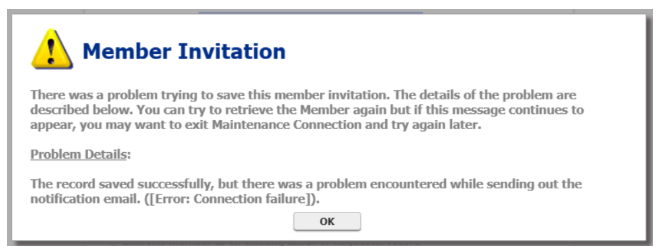
This means that the connection from Accruent MC is not getting to the email server.
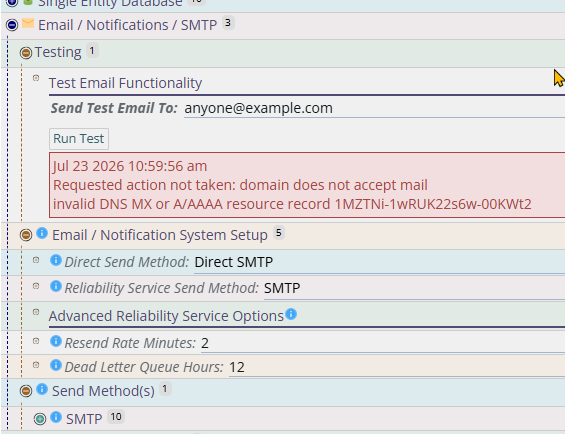
the mc_diag.asp page has an email test, this page is normally made not accessible so you. Also the MC Agent has an email test. Both obviously are different configuration sources and thus need to be configured individually to be correct.
And then it should be obvious but MCe ALSO has configuration for sending email and its own email test, and it also needs to be configured.
Accruent's MC_Agent also has an email test.
They both have to be configured to run and if either of them aren't running, then you can expect that your emails won't go out.
If they are both configured, then there is at least an 80% chance that your emails will now go out. But there are other issues neither of them catch.
Where to configure:
If you are using the OS/your own email redirector/just MC to manage it:
mc_diag.asp – Configured in the mc.ini file on the server.
- This may need to be changed manually after each MC upgrade,
- This will need to be changed manually every time your password changes
- and every time you set or change the mc.ini, manually verify that the mc_ini table in the reg database has the same values.
- MC Agent – Configured through the Agent Control Panel
If you are using MCe redirector
- MCe – Configured through the MCe Management Tools.
There are lots of ways your server can be set up to break email. Here are some to consider:
Some hosting networks block port 465, if so, switch the outgoing SMTP port perhaps to 587 with STARTTLS
See also: Document mostly on initial setup
Prior to Windows 2022+
The Windows built in SMTP Relay which allowed centralizing the configurations of sending to your own mail servers was a recommendation.
But Windows 2022 took it away, and while you CAN reinstall it on 2022, we have received reports that some Windows point releases disable it, so we no longer recommend that option.
Instead either use the MCe reliability email service (available just for the cost of setting up and maintaining it) or pick a different solution.
Other than the MCe advanced reliability email service, we really don't have any suggestions. There are various packages available and we haven't seen any we like, and the ones we've tried with customers when they really wanted to use our Professional Services, have not been good overall experiences. So starting in 2025, if you use our Professional Services to help you fix email problems with Window's server, we only use our MCe reliability service.
Think of it this way: When Windows stopped supporting their SMTP relay, if you weren't already on the MCe reliability email service - you really should upgrade to it.
Manually maintaining a bunch of separate settings, is doable. But more expensive and more error prone than centralizing with the Reliability Service or previously with the Windows SMTP Relay. Especially since many organizations conclude that security best practices includes updating account passwords often, and updating it in many locations is harder than 1 and creates more opportunities for failure, especially since if you fix in 1 place you will have a reasonable chance of forgetting there was a second or third.
Using ITIQDoc's MCe 'reliability' email server
One very good idea for email problems is to move most of them out of the 'old' email server options and into the email server that MCe has used the past 20 years. It avoids the 'Windows took away this feature with the last Windows update" type problems. It also tends to give better, more detailed, error messages when there are problems.
This server is available at no extra charge to any of our customers that get their MC SMA through us. We only charge for setup time. For most customers setup time is 1 to 2 hours of Professional services.